DataTools4Heart Docs
Comprehensive documentation for DataTools4Heart community software
View the Project on GitHub DataTools4Heart/documentation-hub
API for Federated Processing Environment
The Federated Processing Environment (FEM) also provides an API interface that can be used to programmatically trigger distributed and federated experiments.
- The URL to the API is:
https://fl.bsc.es/dt4h-fem/API/v1/docs
Authorize User
In order to use the API, authorization is required by pressing the Authorize button located at the top-right corner.
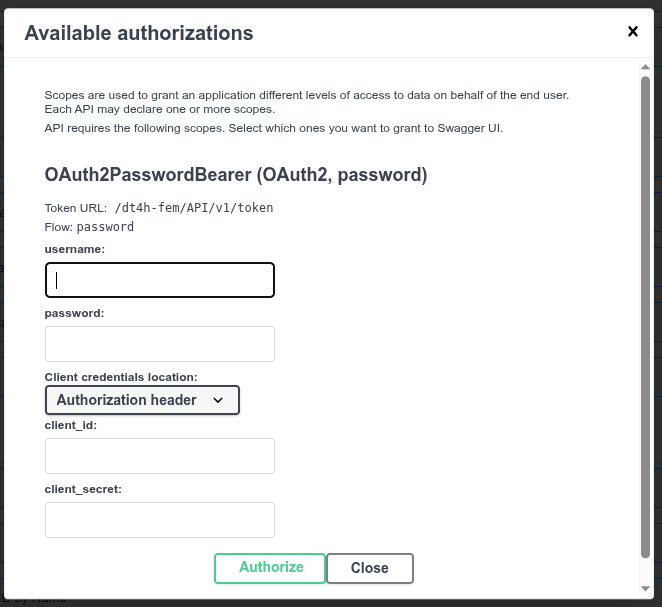
The required credentials are the same ones used to authenticate any user in the web interface of the Federated Processing Environment or any other DT4H product.
Basic Knowledge
In FEM, a “tool” is the core component of any experiment. It refers to a complete piece of software that can be run in a distributed or federated manner. A “tool,” therefore, can include one or more “tasks.” For example, software that is run exclusively in a distributed manner will have a single “task,” while a federated software, for instance a federated learning framework which requires at least an aggregator and one or more trainers, will have two or more “tasks.”
An “execution” is the record of a performed job. It can consist of one or more “tools” or “tasks.” For example, when running a health-check (a “tool” with a single “task”), we log an execution ID to trace the user who triggered the execution and the nodes on which it was run. Similarly, we can run a health-check tool followed by an Flcore tool (a single tool with two tasks: flcore-server and flcore-client), and all of them will be logged under a single execution ID.
Endpoints
Hosts
A “host” is a node or machine that has the FEM client installed. Therefore, it is a location where “tools” and “tasks” can be run.
/hosts(GET): Lists all the “hosts” that are part of the “federated network” of DT4H./hosts/resources(GET): Lists the available resources of one or more “hosts”./hosts/heartbeat(GET): Triggers aheartbeaton one “host”. Theheartbeatchecks whether a given FEM client is connected to the RabbitMQ service./hosts/datasets(GET): Lists all available input datasets on all “hosts” that are part of the “federated network” of DT4H./hosts/{host_id}(GET): Provides the description of a “host” stored in FEM’s internal database.
Tools
A “tool” is the definition of a piece of software in FEM. A “tool” can include one or more “tasks” depending on its execution mode: distributed or federated.
/tools/(GET): Lists all “tools” available in DT4H./tools/{tool_id}(GET): Provides a detailed description of a single “tool” given its ID./tools/job/{tool_id}(POST): Triggers a “tool” on one or multiple “hosts” (if necessary, specifying a server or main host and one or more client hosts).
Tasks
A “task” is the part of a “tool” that is executed on a “node”.
/tasks(GET): Returns the list of available “tasks” in DT4H./tasks/{task_id}(GET): Returns the internal description of a single “task”.
Data
Data can only be queried and downloaded by its owner.
/data/list_files(GET): Lists all available output files for a user for a given “execution” or on a given “host”./data/download_files(GET): Downloads a single file if specified for a given “execution” on a given “host”. If no file is specified, it downloads all available results for that “execution” on the given “host”.
Executions
/executions/status/{execution_id}(GET): Returns the status of a given execution./executions/cancel_run/{execution_id}(GET): Cancels a given execution./executions/logs/{execution_id}(GET): Retrieves the logs of a given execution./executions/report/{execution_id}(GET): Returns the software’s image that is/was run, the used environment variables, execution command, resource consumption, exit code, start time, stop time, and elapsed time for the execution.